A kitchen display system built for the line.
It opens in a browser on any tablet, monitor, or all-in-one, and every order from the phone, the website, and the counter lands on the same screen. The cook taps Bump when the food goes out and the next ticket slides in. No second system to babysit, no printer to refill, no shouting across the line.
- AI Phone, online, and app orders
- Multi-station routing
- Live prep timers
- 50–200% zoom
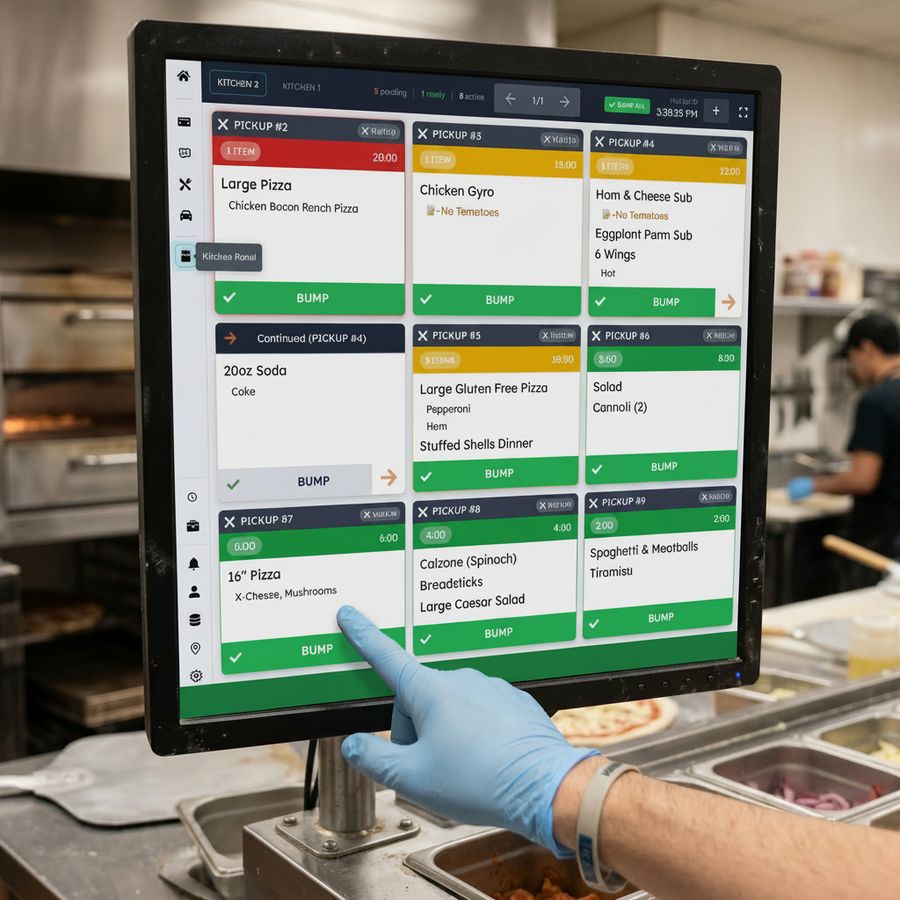
Four states. One clean flow.
The order is real, the timer runs, the cook bumps it, and the screen lets it go. No paper, no ticket stuck on a spike that nobody saw.
A new order lands
Phone, online, pickup, or walk-in, the ticket arrives on the right station the moment the order is confirmed. The pending counter ticks up.
Large Pizza
The timer starts
The status bar turns green and the live timer counts up. The cook sees exactly how long this ticket has been on the line.
Large Pizza
Half 1: Pepperoni
Cook hits BUMP
One tap on the green BUMP bar takes the ticket off the active line. The pending counter drops, the ready counter rises.
Three minutes to recall
The bumped ticket sits in the green ready tray at the bottom of the screen for three minutes. Wrong bump? Tap to recall. Otherwise it auto-clears.
All your order types on one screen
Pickup, delivery, walk-in, and tickets from the AI Phone Agent live on the same screen. The cook reads the source the second the ticket lands, no scrolling, no decoding.
Large Pizza
Half 1: Pepperoni
Half 2: Pineapple
2x Large Margherita
Extra basil
Garlic Knots
2x Coke
Double Cheeseburger
No onion
Extra pickles
Cajun Fries
Vanilla Shake
Chicken Over Rice
White sauce
Extra hot
Lamb Gyro Platter
No tomato
3x Tacos Asada
No cilantro
Burrito Bowl
Extra guac
No rice
Horchata
Picanha Plate
Well done
Feijoada
2x Brigadeiro
30 Wings
Half BBQ
Half Buffalo
Blue Cheese
Celery Sticks
Family Combo Pizza
2x Wings 12pc
Buffalo
Lemon Pepper
2L Coke
A screen for every station you run
The pizza oven and the cold prep line do not need the same tickets. Each station gets its own screen with its own filtered feed. The grill cook never sees the salad ticket. The salad cook never sees the wings.
Switching between stations is one tap on the tab at the top. Add a station when you grow into it. Remove one when the line shrinks.
- Tickets route by item type
- Unlimited stations per location
- Every screen stays in sync
Large Pizza
Chicken Bacon Ranch Pizza
Large Gluten Free Pizza
Pepperoni
Ham
Stuffed Shells Dinner
Readable from across the line
Most kitchen display systems hand you a fixed font size. Ours does not. Tap the plus, set the zoom anywhere from fifty to two hundred percent, and the layout holds up at every step.
Cook standing six feet from a wall-mounted tablet? Push it to one-sixty. Tight expo with a small screen and a lot of tickets at once? Drop it to seventy. The screen fits the kitchen you already have.
Hit BUMP and the ticket drops into the green ready tray below the line. The cook has three minutes to tap it back if it was bumped by mistake. After that the ticket clears on its own. No paper to dig through, no second screen to check.
- Granular zoom from 50 to 200 percent
- Three-minute ready tray with one-tap recall
- Tickets reflow at every zoom level
Chicken Over Rice
White sauce
Extra hot
Lamb Gyro
2L Coke
12pc Wings
Buffalo
Ranch on side
Garlic Knots
Ham & Cheese Sub
No tomatoes
Eggplant Parm
6 Wings
Hot
Large Pizza
Half 1: Pepperoni
Half 2: Pineapple
Caesar Salad
No croutons
Tiramisu
Family Combo Pizza
Pepperoni
Mushroom
2L Coke
Where every order ends up
Phone, web, in-person, and AI calls all converge on the same kitchen screen. No re-entry, no printer running out of tape, no second system to babysit. The order finishes its trip on the line.
AI Phone Agent
Caller hangs up, ticket lands
Online Ordering
Web checkout to kitchen
WhatsApp & Chat
Conversational orders
Counter sales
Walk-up orders from the register
Restaurant Website
Orders from your own site
Kitchen Display System
Every channel ends here. The cook taps BUMP and the next ticket slides in.
The hubOne flat price. Every screen and every driver included.
Most kitchen display systems charge per screen and most delivery management systems charge per driver. The bill grows every time you add a station or a runner. We do not work that way. One flat monthly price covers the KDS, the Driver App for iOS and Android, multi-stop route optimization, and live dispatch from the order dashboard — the complete self-delivery stack in one box.
KDS + Delivery Management for Self-Delivery Restaurants
Your KDS sits in the same platform that runs your AI Phone Agent, online ordering, counter sales, driver dispatch, and order dashboard. One platform, one bill, zero per-driver fees.
From$40/mo
per location, unlimited screens, unlimited drivers
$40–$50/mo depending on which AI Phone Agent plan you bundle it with.
- Unlimited stations and screens per location
- Native ticket flow from every AI Bunny channel — AI Phone, online ordering, mobile app, whatsapp, counter
- Opens in any modern browser, on any tablet or monitor
- Setup and configuration support
- Driver App for iOS and Android with one-tap multi-stop route optimization
- Live driver dispatch, assignment, and Driver Track from the order dashboard
- Square Tap to Pay built into the driver app — no separate card reader
- Automatic end-of-day cash and card reconciliation per driver
Questions we get from kitchens
Try it on your line
Setup takes minutes. The team can use it the same shift, no training session and no migration.
Get Started